|
Workload Balancing |

Overview
The Workload Balancing report shows details about the current workload in the RRAC. It is generated in two different forms:
- by Region and Role
- by RRAC Person
The report entity is Coverage Group. The report by Region and Role shows totals by person, role, region and the entire RRAC. The report by RRAC person lists all Coverage Groups for each person.
The report by Region and Role is hyperlinked to the report by RRAC Person. To open the report by RRAC Person and show a list of Coverage Groups for a person, click on a person's name in the report by Region and Role.
In order to be listed in the Data Warehouse, a Coverage Group must have:
- at least one Activity in the Activity History
- a person assigned to it as Underwriter
- a RRAC person assigned to any Activity
- a Case with a valid RFP-Received Date
This report does not register Coverage Groups that are:
- more than 5 days overdue
- in any Activity other than Underwriting and Follow-up on Missing Information.
Therefore, inactive Coverage Groups are excluded.
Table of Contents
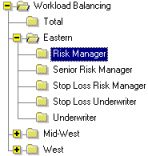
The Workload Balancing Report by Region and Role has summary pages for regions and a total page for the RRAC. To navigate to a summary page, double-click on the corresponding node in the Table of Contents. The Workload Balancing Report by RRAC Person does not have summary pages.
Report Detail
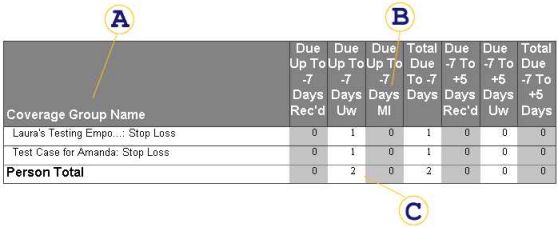
The Coverage Group name consists of the first 20 characters of the Sponsor name and the Coverage Group list text. The list text is initially generated as the list of Product Lines in the Coverage Group. However, if you split off Coverages into separate groups later in the process, the generated list text will no longer be correct. In this case, you have to edit the list text and manually give the Coverage Group a meaningful name.
On the report by Region and Role you will see either region names, role names or RRAC person names in this area.
Each Coverage Group must have a "1" in only one column (not counting the two total columns). Amounts in the total columns are simply a total of the "1's" in the preceding columns.
Due Up To -7 Days Rec'd
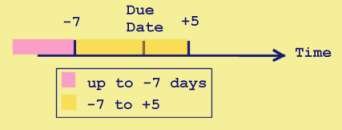
Not used (Status Received is not defined in Sun Link). Due Up To -7 Days UW A Coverage Group registers in this column if its Due Date is 7 or more days in the future and it is currently in and Underwriting 1, Underwriting 2 or Re-Underwriting Activity. The reference date is the date shown in the report header next to "as of". Due Up To -7 Days MI A Coverage Group registers in this column if its Due Date is at least 7 days in the future and it is currently in a Follow-up on Missing Information Activity. Total Due To -7 Days This column represents the total number of Coverage Groups due within 7 or more days. Due -7 To +5 Days Rec'd Not used (Status Received is not defined in Sun Link) Due -7 To +5 Days Uw A Coverage Group registers in this column if its Due Date is between 7 days ahead and 5 days overdue and it is currently in an Underwriting 1, Underwriting 2 or Re-Underwriting Activity. Total Due -7 To +5 Days Total number of Coverage Groups due between 7 days ahead and 5 days overdue
The total by person, role, region or the entire RRAC is the sum of all "1's" in that column and is therefore the sum of all Coverage Groups due in this time frame.